

Your TensorAlgo Profile can be more than account information. It gives you one place to manage your identity and links, build a public TensorAlgo page for your audience, and understand which links or Playbooks attract attention.
This is especially useful for traders, streamers, and creators who want a clean public destination without building a separate mini-site from scratch.
Choose the timezone used for your trade dates and times
Open Settings → Profile and use Timezone to control supported user-facing trade dates and displayed times.
- Automatic — Device timezone uses the current browser/device timezone.
- Choosing an explicit IANA timezone such as America/New_York, Europe/London, or Asia/Bangkok makes that saved profile timezone authoritative for supported user-facing trade dates and times.
The profile timezone is used for Trade History, Trade Intelligence Center, trade analytics, CSV history reads, dates, and displayed times. A saved explicit timezone takes priority over the device timezone, which is useful when travelling or when you want your trading records to remain on a consistent reference timezone.
This preference does not rewrite market sessions, exchange hours, or maintenance clocks. Those keep their market-specific timezone.
Changing the profile timezone takes effect after the profile is saved; the dashboard updates the authenticated profile state without requiring a full sign-out/sign-in cycle.
Turn your profile into a public TensorAlgo page
Open Settings → Profile → Public Page to build the page visitors can see through your TensorAlgo public URL.
The builder lets you prepare the page while it is still private, preview your changes, and enable it only when you are ready to publish.
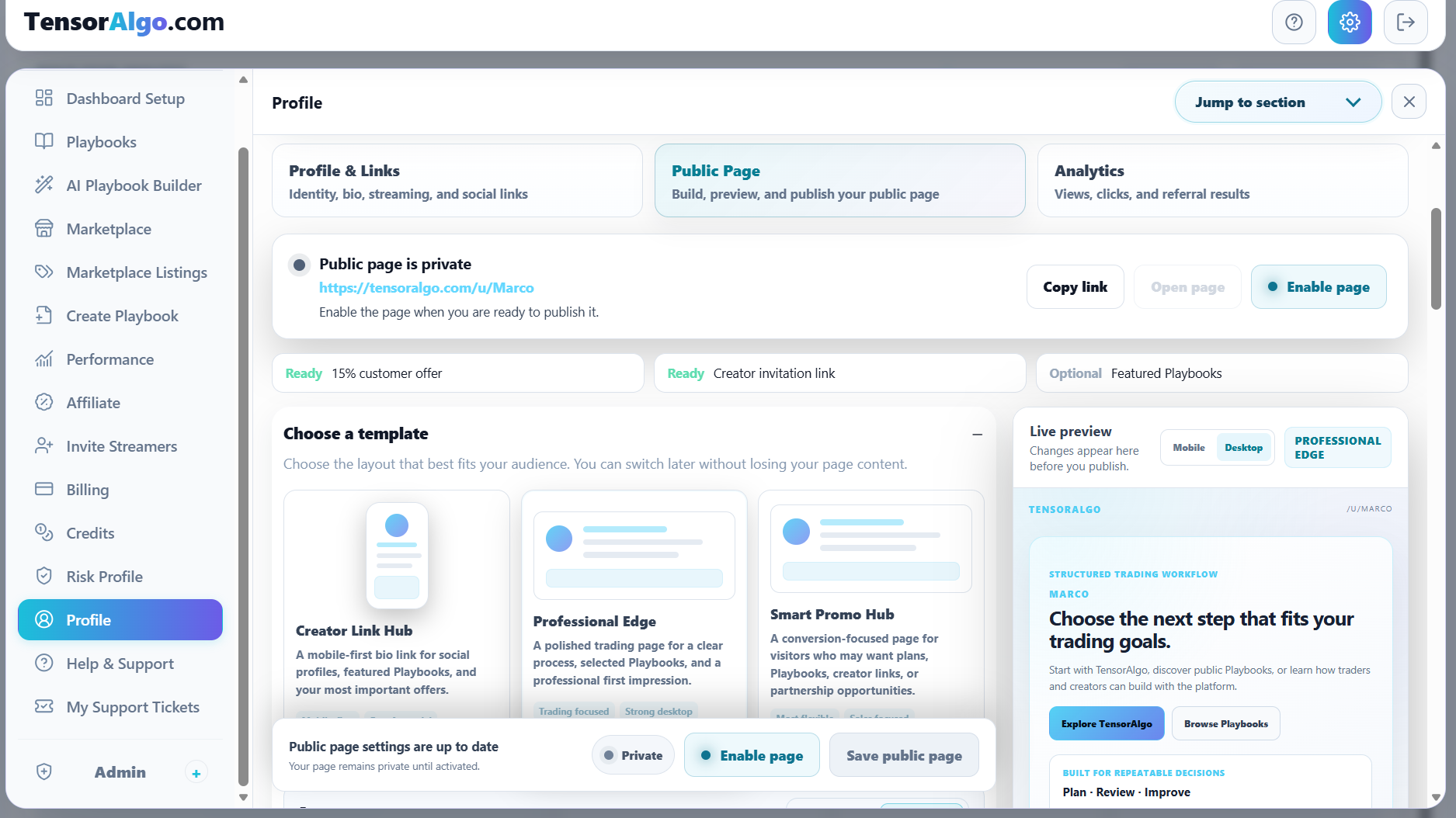
A useful workflow is:
- keep your profile and social links current;
- choose a public-page template;
- tailor the page for the audience you want to reach;
- preview the result on desktop and mobile;
- enable and save the page when it is ready.
Choose the page style that fits your goal
TensorAlgo currently provides three public-page templates:
Creator Link Hub
A mobile-first bio-link style page for social profiles, featured Playbooks, and important offers. It is a strong fit when most visitors arrive from a stream, social bio, or mobile link.
Professional Edge
A polished trading page focused on a clear process, selected Playbooks, and a professional first impression. It works well when you want your public presence to feel more like a focused trading profile.
Smart Promo Hub
A more conversion-focused page for visitors who may want plans, Playbooks, creator links, or partnership opportunities. It is useful when your audience may have several different reasons for visiting.
You can switch templates later without having to recreate the rest of your profile content.
Preview before you publish
The Live preview updates while you configure the page, so you can see how the current template and content work together before making the page public.
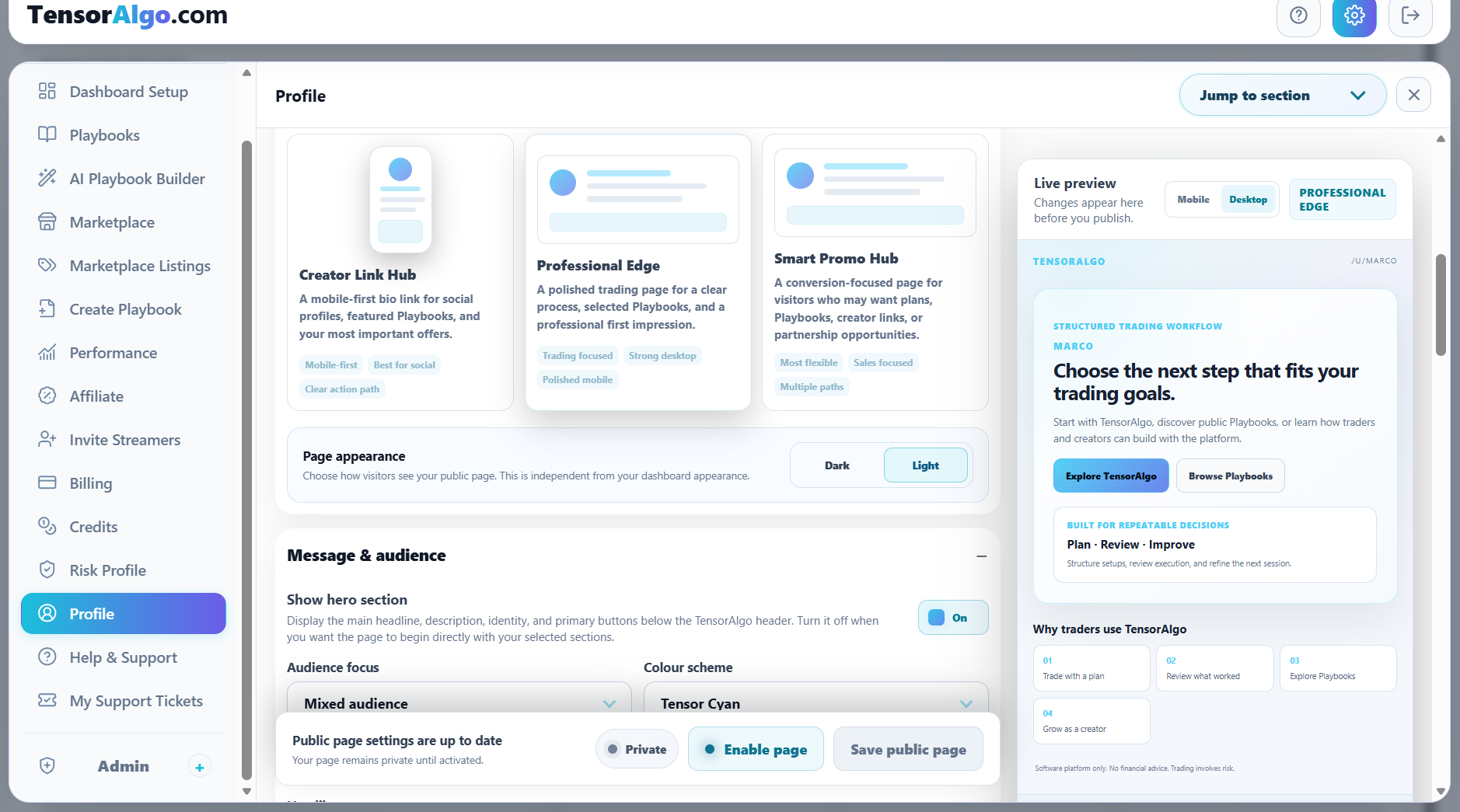
Use the available desktop/mobile preview controls to check the page for the devices your audience is likely to use.
Your public-page appearance can also be set independently from your personal TensorAlgo dashboard appearance. This lets you keep the dashboard in the theme you prefer while choosing the public presentation that works best for visitors.
Shape the page around your audience
The public-page builder can tailor the page around different audience focuses, including mixed audiences, prop traders, newer traders, professional traders, creators/streamers, Playbook buyers, and Playbook sellers.
Depending on your account capabilities and configuration, the page can bring together elements such as:
- your profile identity and bio;
- social links;
- selected or featured Playbooks;
- TensorAlgo discovery links;
- referral or creator invitation paths where available;
- custom external links;
- audience-specific calls to action.
The goal is to give visitors a focused next step instead of sending them through unrelated parts of the platform.
Publish when the page is ready
The editor separates the page's configured state from its published state so you can make changes safely before visitors see them.
When the page is private, use Enable page and then Save public page to publish the enabled state. If you later decide to make the page private again, update the state and save that change.
Use Copy link to share the public URL once the page is live.
Learn what your audience actually opens
The Analytics area helps you understand whether the public page is attracting attention and which actions visitors take.
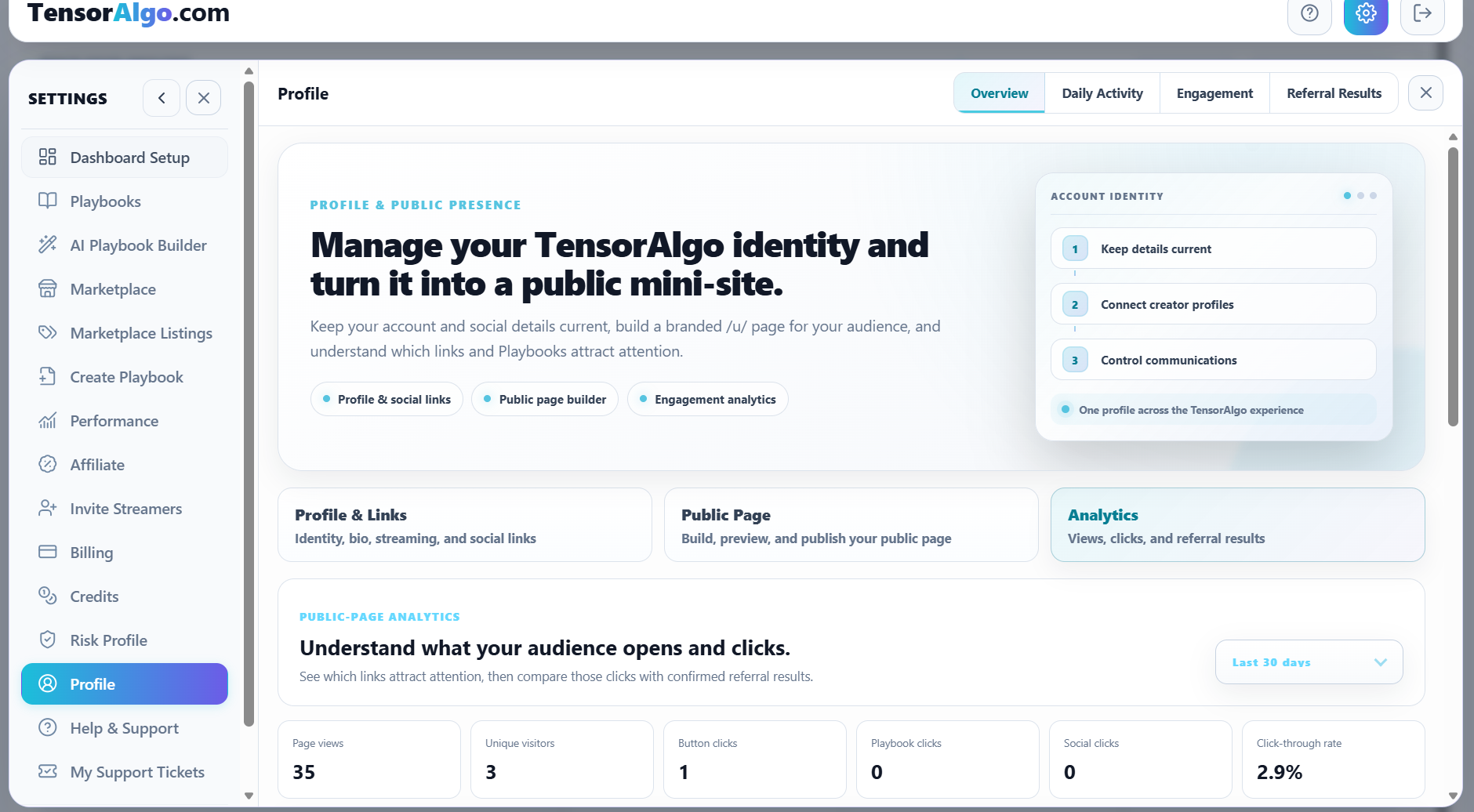
The overview can include metrics such as:
- page views;
- unique visitors;
- button clicks;
- Playbook clicks;
- social clicks;
- click-through rate.
Use those signals to learn what visitors are actually interested in. For example, if a featured Playbook receives attention while another call to action does not, you can adjust the page around the content your audience is choosing to explore.
Keep the profile useful over time
A public page works best when it stays current. Revisit it when you publish a new Playbook, change your main social channel, update the audience you are speaking to, or want to test another page template.
The page is designed to be editable, so publishing it is not a one-time decision.
Troubleshooting your public page
If the page is not visible publicly:
- confirm that the page is enabled;
- save the public-page settings after changing the enabled state;
- make sure you are opening the current public URL;
- refresh once after publishing.
If a Playbook, referral path, creator invitation, or other optional block is unavailable, confirm that the related capability is available and configured for the current account.
If the saved page or analytics still does not behave as expected, open a Support Ticket and include the public-page URL and the action you were trying to complete.