

The easiest way to understand TensorAlgo is to follow one Playbook from defined strategy → current plan → recorded result.
You do not need to learn every dashboard card at once. Start with one active Playbook and learn how its strategy state moves through the tools around it.
Start with the Playbook
A Playbook is the structured trading plan TensorAlgo evaluates. It contains the supported market, strategy logic, and the applicable execution settings.
Before watching the dashboard, open the Playbook and make sure you can answer:
- Which market does it belong to?
- Is it looking for long setups, short setups, or both?
- What strategy or sequence is it built around?
- What are the main entry, stop, target, and management preferences?
You do not need to memorize every setting. You only need enough context to recognize the setup when it appears elsewhere.
Watch how the setup progresses
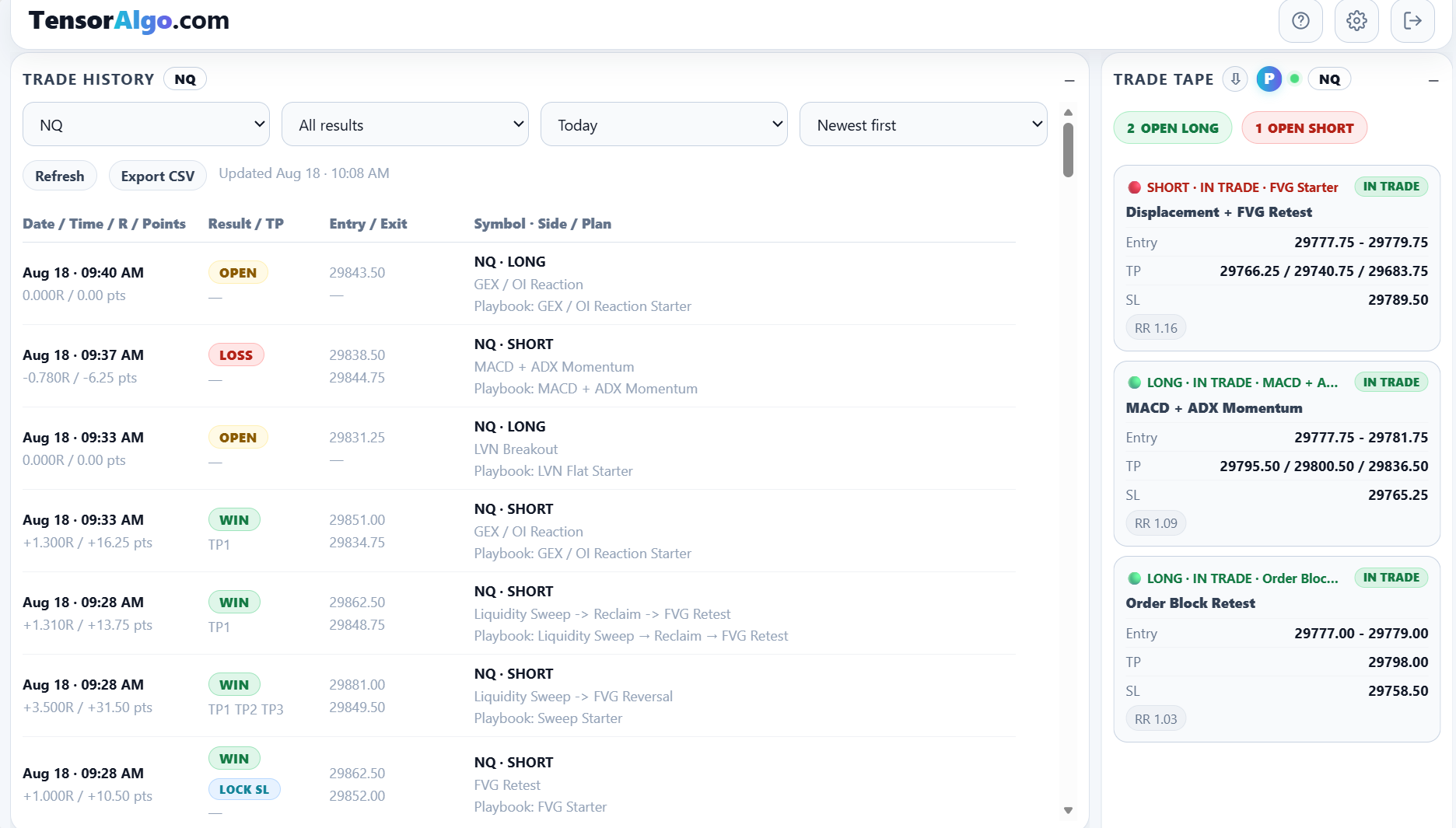
Trade Tape can show current plans produced by active Playbooks. Depending on the lifecycle, a setup can move through states such as planned, armed, triggered, in trade, or an exit-warning state.
A current plan can include the Playbook, strategy, direction, entry or entry zone, targets, stop, and planned risk/reward.
If nothing appears immediately, that is not necessarily a problem. An active Playbook can legitimately have no qualifying current plan until its supported conditions are met.
Understand the difference between a setup and a completed result
A current setup is still part of a lifecycle. Trade History can contain open records as well as completed outcomes.
Do not treat an open setup as a final win or loss. Wait until the record has enough completed lifecycle information before using it as evidence about the strategy.
Use Trade History to see what was recorded
Trade History is where you can review saved records by market, result, period, and date. Rows can tie an outcome back to the side, strategy/plan, and Playbook that produced it.
That connection matters because “I lost a trade” is not very actionable. “This Playbook's short setup has repeated losses during one session” is a question you can investigate.
Learn the meaning of R and points
Trade History can show both points and R. Points describe market distance; R expresses the result relative to the trade's planned risk basis when that value is available.
R is useful when comparing trades whose stop distances or instruments differ, because it gives you another way to compare outcomes without looking only at raw points.
Do not change the Playbook after every single outcome
One of the most important habits in TensorAlgo is to separate a single result from a repeatable pattern.
After a first win or loss, make sure the Playbook behaved as intended. If it did, keep collecting evidence. Trade Intelligence Center includes sample-size guidance specifically because a small number of trades can be misleading.
Move from the setup to Trade Intelligence
Once you have enough completed records, Trade Intelligence Center can aggregate the history and help you look at:
- Playbook and strategy contribution;
- session differences;
- execution quality;
- downside and risk patterns;
- sample size and reliability.
This is where the first setup becomes part of a broader learning process rather than a one-off event.
A simple first-session checklist
- Pick one active Playbook to follow.
- Read its strategy summary and execution settings.
- Keep its Playbook card or relevant dashboard card visible.
- Watch Trade Tape for current lifecycle activity.
- Check Trade History after the setup progresses.
- Confirm the recorded row is tied to the Playbook and strategy you expected.
- Repeat before drawing conclusions from performance.
If the current setup looks different from the Playbook you expected, start by checking the active Playbook, selected market, and strategy name before changing the strategy itself.